

Download X-Lizard PM – Secure, Free Password Manager for Windows, Mac, Android & iOS
Looking for a lightweight, secure, and easy-to-use password manager? X-Lizard PM is a compact tool designed to help you store, organize, and generate strong passwords across all your devices. With built-in 256-bit AES encryption and a master password protection system, your sensitive data stays safe from unauthorized access.
Whether you're managing multiple online accounts, social media logins, or work credentials, X-Lizard PM streamlines the process with a clean tabbed interface. It’s ideal for users who value privacy and simplicity over complex features. The app includes a powerful password generator, automatic clipboard handling, and seamless copy-paste functionality—perfect for those tired of password fatigue.
Available for Windows, Mac, Android, and iOS, X-Lizard PM ensures your data is accessible wherever you go. Download this free password manager today and take full control of your digital identity with confidence.
Key Features of X-Lizard PM
One of the standout reasons users choose X-Lizard PM is its focus on simplicity without sacrificing security. The software is packed with essential features that make password management effortless. First and foremost, 256-bit AES encryption ensures your password database is protected at the highest industry standard. This means even if someone gains access to your file, they won’t be able to decrypt it without the master password. The master password is the only key to unlock your vault, making it critical to choose a strong, memorable phrase.
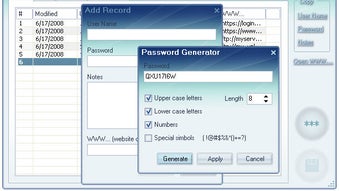
Another major highlight is the built-in password generator. Whether you're creating a new account or updating an old one, X-Lizard PM can generate complex, random passwords with customizable length and character types (uppercase, lowercase, numbers, special symbols). This feature is especially useful for users who struggle with coming up with unique, secure passwords for every site.
The tabbed interface organizes your credentials into intuitive categories like Web, Email, Programs, and more. This structure helps you quickly locate the right login details without scrolling through endless lists. You can copy credentials with a single click and paste them directly into login fields—ideal for frequent logins. Additionally, X-Lizard PM supports auto-fill via clipboard, which reduces the risk of manual errors and enhances usability. The software also allows you to store notes, URLs, and other relevant information alongside each entry, making it more than just a password vault.
Despite its minimal design, X-Lizard PM offers robust functionality. It’s lightweight, runs smoothly on older systems, and doesn’t consume excessive memory. For users who want a no-nonsense, reliable password manager, this tool delivers exactly what it promises—security, simplicity, and ease of use.
How to Install and Use X-Lizard PM
Getting started with X-Lizard PM is straightforward, whether you're using Windows, Mac, Android, or iOS. Begin by visiting the official website and downloading the appropriate version for your device. The installer is small in size (under 10MB), making it quick to download even on slow connections. Once downloaded, run the setup file and follow the on-screen instructions. No complicated configurations are required—just accept the default settings and let the software install.
After installation, launch the app and create your first password database. You’ll be prompted to set a master password. This is the most critical step—choose a strong, unique phrase that you won’t forget but is hard to guess.
Once set, your database is encrypted and ready to use. To add a new entry, click the “Add” button and fill in the details: site name, username, password (or generate one), URL, and any notes. The tabbed system allows you to assign each entry to a category like “Social Media” or “Banking” for better organization.
Using X-Lizard PM during daily tasks is seamless. When logging into a website or app, simply copy the username and password from the app, then paste them into the login form. The software also supports clipboard auto-clearing after a set time (configurable in settings), which adds an extra layer of security by preventing sensitive data from lingering in your clipboard.
For advanced users, X-Lizard PM allows you to export your database in a secure format (encrypted .xlp file) for backup purposes. You can also sync your database across devices using cloud storage like Google Drive or Dropbox—just ensure the file is encrypted and stored securely. Regular updates are released to improve performance and fix bugs, so always keep your version up to date.
Compatibility & System Requirements
X-Lizard PM is designed to run on a wide range of platforms, making it one of the most accessible password managers available. It supports Windows 7 and later, including Windows 10 and Windows 11, ensuring compatibility with both modern and legacy systems. On macOS, it works on macOS 10.12 (Sierra) and newer, including the latest Apple Silicon (M1/M2) Macs, thanks to native support and optimized performance.
For mobile users, X-Lizard PM offers dedicated apps for Android (5.0+) and iOS (12.0+). These mobile versions mirror the desktop experience with full access to your password database, allowing you to manage and retrieve credentials on the go. The mobile apps are lightweight and don’t drain battery life significantly, making them ideal for daily use.
System requirements are minimal, which is a major advantage for older devices. On desktops, you only need a few hundred megabytes of free disk space and 512MB of RAM. The app launches quickly and runs efficiently, even on low-end machines. There are no background processes or constant updates that slow down your system.
Importantly, X-Lizard PM does not require an internet connection to function. Your data remains local and private, which is a big plus for users concerned about cloud-based security. While there’s no native browser extension, you can still use the app alongside your browser by copying and pasting credentials manually. Future updates may include browser integration, but for now, the offline-first approach ensures maximum privacy.
Pros and Cons of X-Lizard PM
- Pros:
- 256-bit AES encryption for top-tier security
- Simple, intuitive tabbed interface
- Powerful password generator with customization
- Free to download and use with no ads
- Lightweight and fast, even on older systems
- Supports Windows, Mac, Android, and iOS
- Offline-first design ensures privacy
- Auto-clear clipboard for enhanced security
- Cons:
- No browser extension for auto-fill (manual copy-paste required)
- Cannot create custom categories (fixed list only)
- Limited cloud sync options (requires manual file transfer)
- No two-factor authentication (2FA) support
- Minimal user interface customization
Frequently Asked Questions (FAQ)
Is X-Lizard PM free to use?
Yes, X-Lizard PM is completely free to download and use. There are no hidden fees, subscriptions, or ads. The software is open for personal and commercial use without limitations.
Can I use X-Lizard PM on multiple devices?
Yes, X-Lizard PM is available for Windows, Mac, Android, and iOS. You can install it on all your devices and access your password database by syncing the encrypted .xlp file via cloud storage like Google Drive or Dropbox.
Does X-Lizard PM support two-factor authentication (2FA)?
No, X-Lizard PM does not currently support 2FA integration. However, you can store 2FA backup codes securely within the app’s notes section for easy access.
How secure is X-Lizard PM?
X-Lizard PM uses 256-bit AES encryption and a master password to protect your database. Your data is encrypted locally and never leaves your device unless manually shared. The software also includes clipboard auto-clearing to prevent accidental exposure.
Can I export my password database?
Yes, you can export your database in the encrypted .xlp format for backup or transfer. This ensures your data remains secure while allowing you to restore it on another device or system.
Final Verdict & Call to Action
If you're searching for a secure, free, and lightweight password manager that prioritizes privacy and simplicity, X-Lizard PM is an excellent choice. It delivers core functionality with a clean interface and strong encryption, making it perfect for users who don’t want to deal with bloated features or subscription models. While it lacks browser extensions and custom categories, its strengths far outweigh its minor limitations.
For individuals managing a handful of accounts or professionals who value data control, X-Lizard PM provides a reliable, no-frills solution. The ability to generate strong passwords, organize entries by category, and keep everything encrypted offline makes it a trustworthy tool for everyday use.
Don’t wait—download X-Lizard PM today and take the first step toward better password hygiene. Whether you’re on Windows, Mac, Android, or iOS, this secure password manager is ready to protect your digital life with minimal hassle.







